Better AI videos start before the prompt.
The Seedance 2.5 preview information has quickly attracted attention. Longer AI video generation, richer reference inputs, and more controllable video editing all sound exciting. But more power also creates new challenges.
A longer video has more time for characters to drift, products to change, motion to break, lighting to shift, and audio to lose rhythm.
More references can improve control, but they can also create confusion if the assets are not organized.
That is why creators should prepare an AI video asset checklist before generating with Seedance 2.5. This article is a practical pre-generation checklist for creators who want to be ready when the model becomes available.
💡 The goal is simple:
prepare better inputs
reduce retries
build a more stable AI video production workflow
Why Does Asset Preparation Matter for Seedance 2.5?
More inputs need clearer rules.
Seedance 2.5 is expected to give creators more room for longer scenes and richer references. That sounds like a major upgrade, but it also means creators need stronger planning before generation.
A longer AI video needs a clear beginning, motion path, visual rhythm, audio timing, and ending frame. If the creator does not plan these elements, the model may generate something visually impressive but hard to use.
When creators only use a few images, the main problem is often missing information. When creators use many references, the problem becomes unclear information.
❔ Common questions appear quickly:
Which image defines the character’s face?
Which reference controls clothing?
Which video should guide motion only, not visual style?
Which audio controls rhythm?
Which product image is the approved version?
Which scene reference has priority if two backgrounds conflict?
Which assets are safe for commercial use?
In other words, asset preparation becomes part of creative control.
A strong Seedance 2.5 workflow should not begin with “What prompt should I write?” It should begin with “What assets should I trust?”
How to Prepare an Asset Sheet for AI Video Creation?
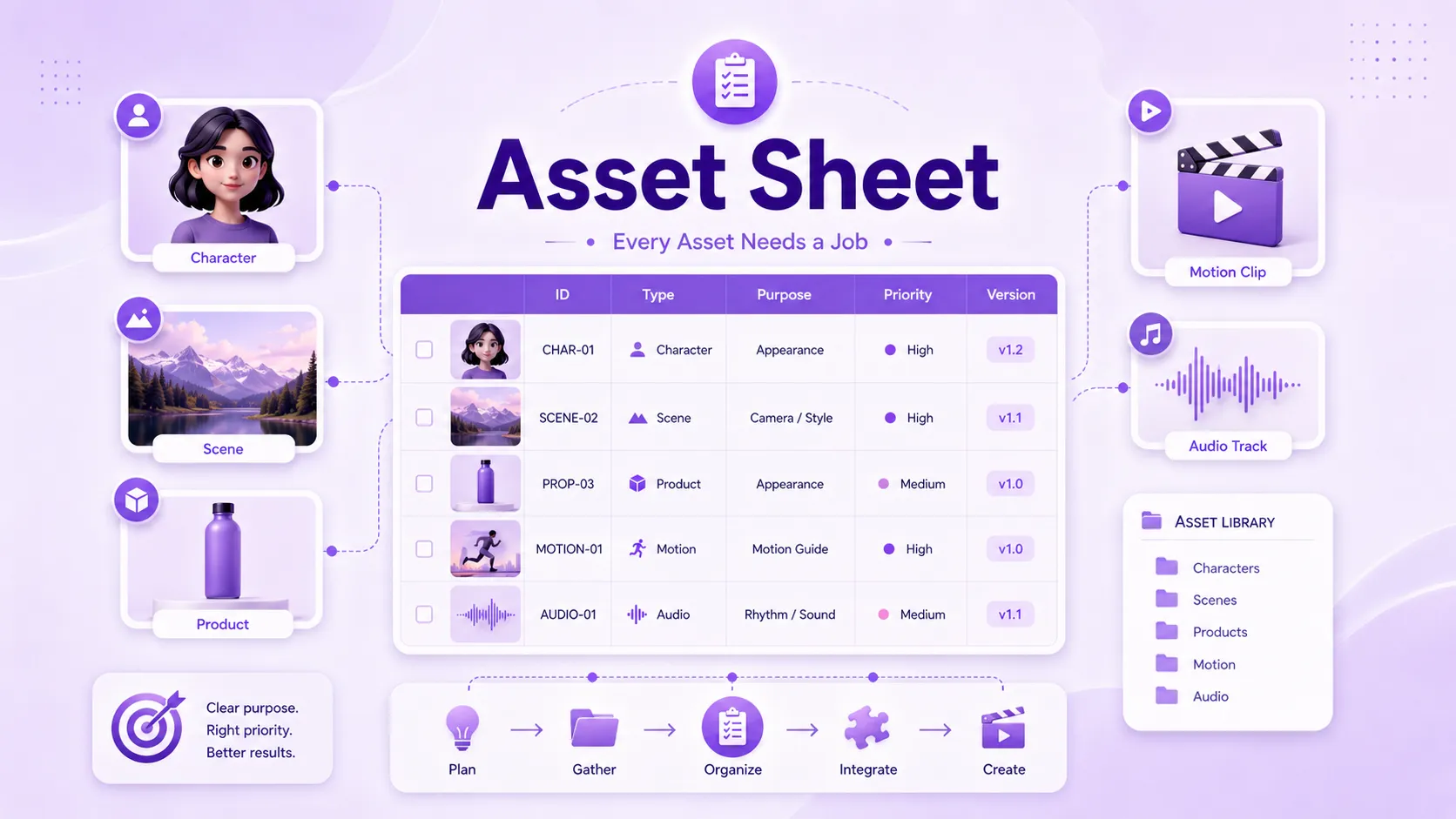
Every asset needs a job.
The first table creators should prepare is an asset sheet. This is not just a folder list. It is a control document that tells the creator, team, and model what each input is supposed to do.
Without an asset sheet, it is easy to upload character images, product photos, scene references, motion videos, and audio clips into one folder with names like “final,” “new final,” or “real final.” That may look manageable at first, but it becomes confusing once the project grows.
💡 A useful Seedance 2.5 asset sheet can include these fields:
Field | What to Write | Why It Matters |
Asset ID | CHAR-01, SCENE-02, PROP-03 | Makes every asset easy to track |
Asset Type | Character, scene, product, prop, motion, audio | Defines the role of each input |
File Name | Exact local file name | Avoids upload confusion |
Purpose | Appearance, motion, camera, rhythm, sound, style | Explains what the asset should control |
Priority | Main reference, secondary reference, do not mix | Reduces reference conflict |
Source & License | Self-made, client-provided, licensed | Helps with copyright and commercial safety |
Version | v1, v2, approved version | Prevents old assets from being reused |
Notes | Fixed details and known issues | Protects important visual elements |
This table helps creators manage AI video reference assets more professionally. If a character’s outfit changes across generations, the asset sheet helps you check whether the model ignored the reference or whether the uploaded references were already conflicting.
For creators, this kind of tracking is especially important. It keeps creative control from becoming guesswork.
How to Prepare a Shot Plan for a 30-Second AI Video?
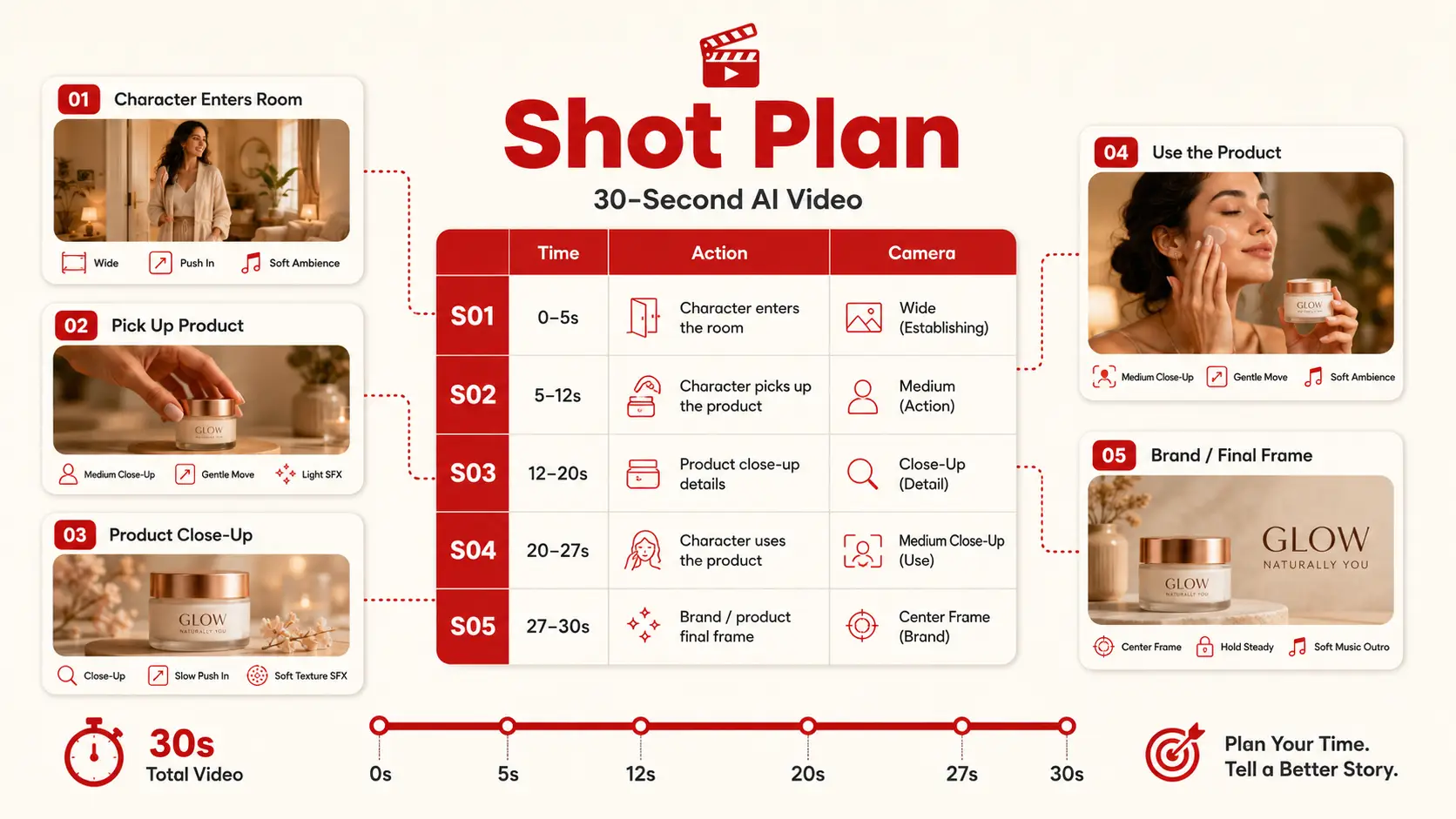
A longer video is a time budget, not a longer prompt.
The second table is a shot plan. This is where creators organize the video before asking the model to generate it.
A common mistake is treating a longer AI video as one extended prompt. But a 30-second AI video usually needs structure. The creator should decide what happens in each time range, what asset is active, what motion matters, and what must stay consistent.
💡 A simple AI video shot plan can look like this:
Shot | Time | Subject & Action | Framing / Camera | Audio | Must Stay Consistent | Can Change |
S01 | 0–5s | Character enters the room | Wide shot, slow push-in | Ambient sound | Outfit, location | Background movement |
S02 | 5–12s | Character picks up the product | Medium shot, slight orbit | First voice line | Product shape, logo | Hand angle |
S03 | 12–20s | Product feature is shown | Close-up, steady camera | Sound effect | UI text, product identity | Light details |
S04 | 20–27s | Character uses the product | Medium to wide shot | Music builds | Character identity | Composition |
S05 | 27–30s | Product and brand appear | Static final frame | Ending sound | Brand color, product | None |
This kind of table helps creators avoid overloaded prompts. If a single 30-second prompt includes three characters, two scene changes, six actions, multiple camera moves, and a long dialogue line, failure is not always the model’s fault. Sometimes the scene simply has no clear structure.
For Seedance 2.5, a shot plan can help creators prepare 30-second AI video workflows, AI video scene planning, and reference-based video generation with fewer surprises.
How to Prepare a Review Checklist for AI Video Quality?
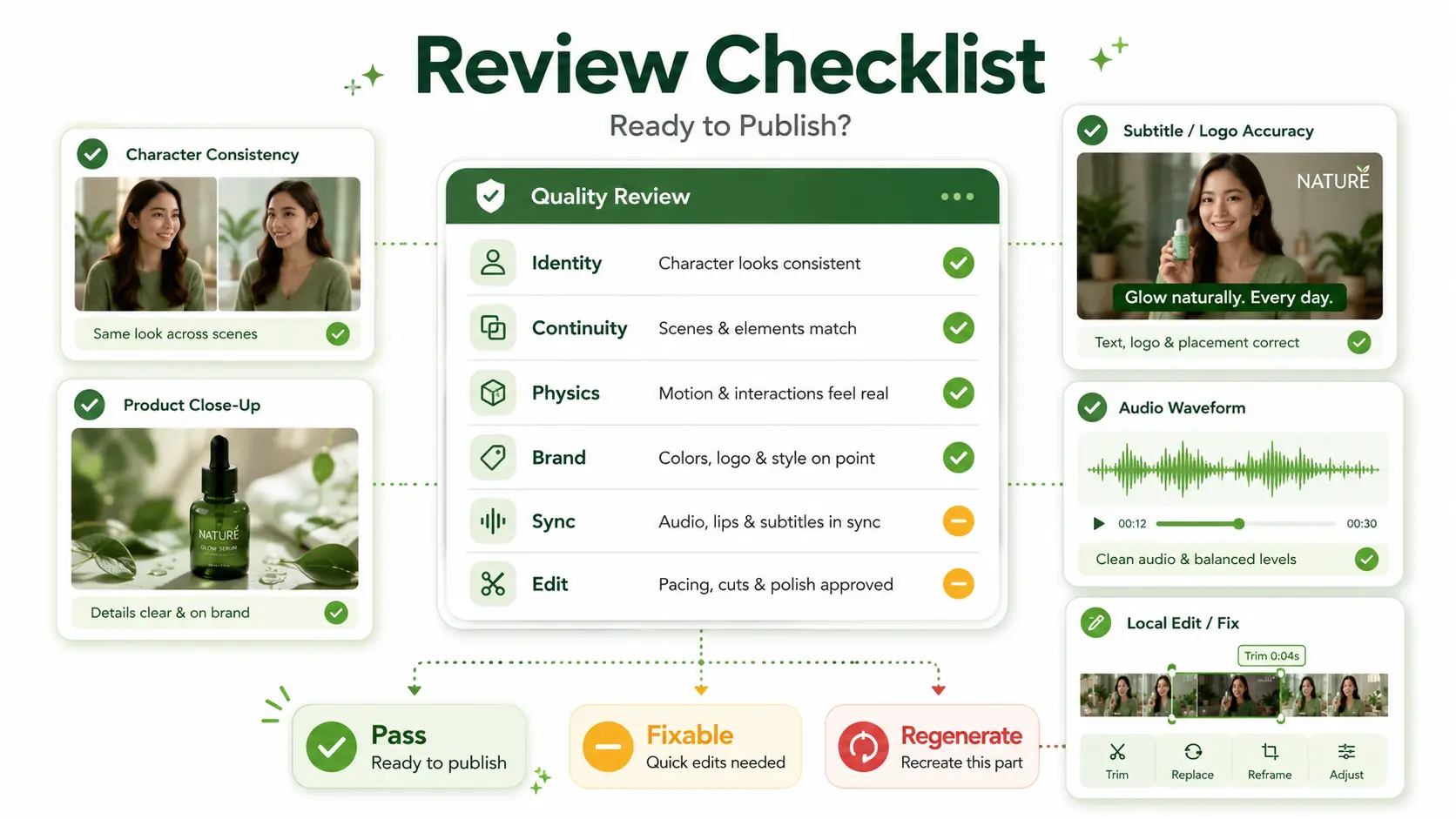
A beautiful clip is not always a usable clip.
The third table is a review checklist. AI video creation often creates a false sense of progress. A video may look exciting at first glance, but still fail as a deliverable asset.
Before generating AI videos, creators should define what “usable” means. This is especially important for commercial AI video, product videos, brand campaigns, and client delivery.
💡 A simple AI video quality checklist can include six review dimensions:
Identity consistency
Are the character, product, logo, and key props consistent across the full video?
Scene continuity
Do location, lighting, motion direction, and camera transitions feel continuous?
Physical realism
Do hands, contact, materials, movement, and object interactions look believable?
Text and brand accuracy
Are subtitles, UI elements, packaging, and brand visuals correct?
Audio-video sync
Do voice, lip movement, ambient sound, music, and action rhythm match?
Editability
Can small problems be fixed with local editing, or does the full video need to be regenerated?
💡 Each item should use a simple status:
Pass
Fixable
Regenerate
Avoid vague review language like “looks cool” or “almost good enough.” A strong AI video review checklist helps creators judge whether a video is actually ready for editing, publishing, or client delivery.
How to Prepare a Cost Tracker for AI Video Generation?
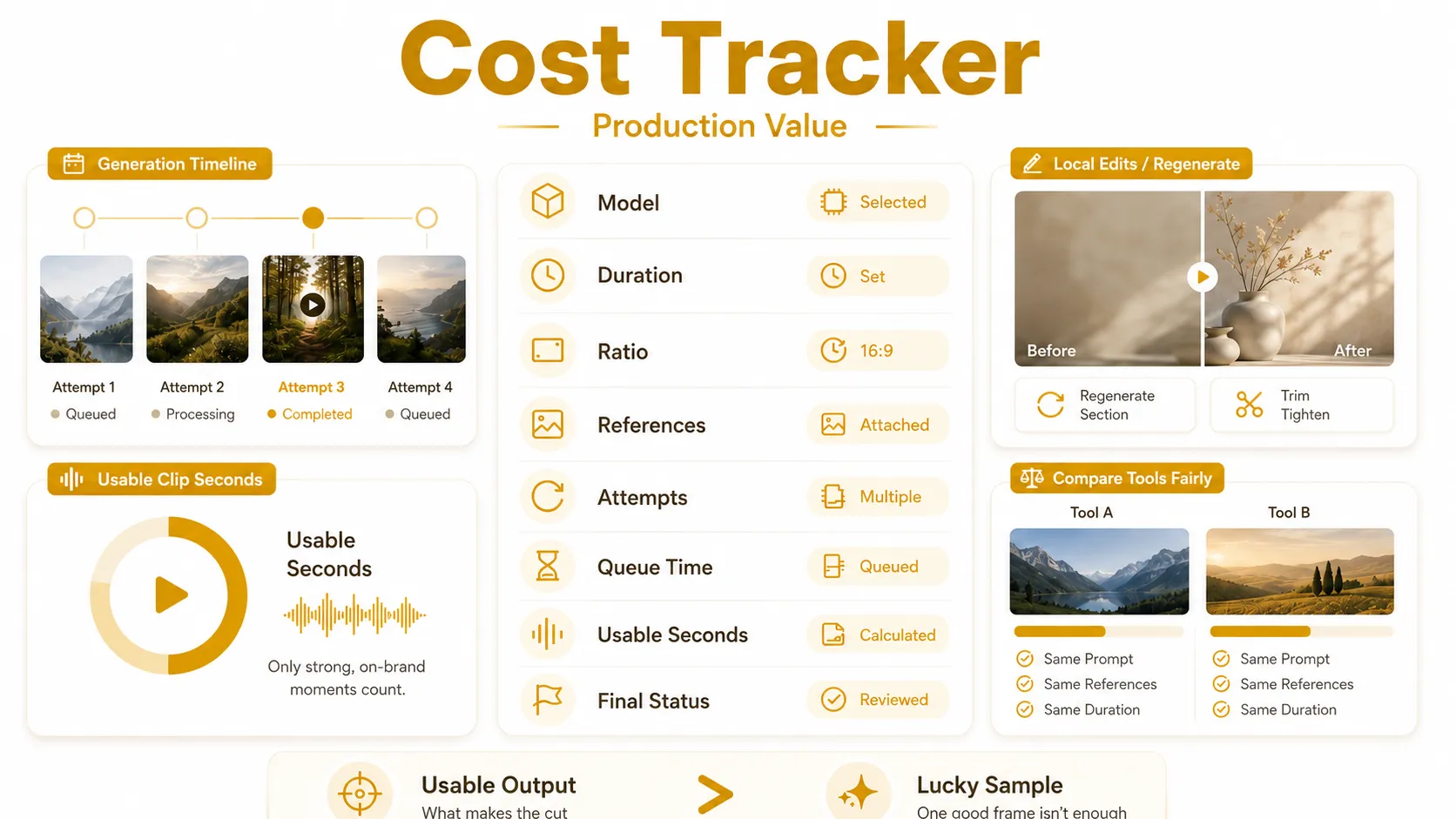
The real cost is usable output.
The fourth table is a cost tracker. In real production, creators need to know the average cost of usable results, not the quality of one lucky sample.
Since Seedance 2.5 pricing and access details should be confirmed after launch, creators should avoid making fixed cost assumptions now. Instead, they can prepare a cost tracking framework.
💡 A useful AI video cost tracker can include:
Field | What to Record |
Model & Entry Point | Model version, product page, or API entry |
Settings | Duration, aspect ratio, resolution, number of references |
Generation Attempts | Total number of tries |
Waiting Time | Time from submission to visible result |
Credit or Usage Cost | Subscription, credits, or API usage record |
Usable Seconds | Final seconds that can enter editing |
Repair Count | Local edits and full regenerations |
Final Status | Pass, fixable, regenerate |
💡 The most useful metric is not simply cost per video. A better production metric is:
Cost per usable second = total generation and repair cost / final usable seconds
This helps creators compare AI video tools more fairly.
A model that looks cheaper may become expensive if it requires too many retries.
A model that looks costly may be more efficient if it produces usable clips faster.
How to Test a New AI Video Generator in 5 Steps?
Use a baseline task, not a random prompt.
When a new AI video model becomes available, the worst testing method is to start with a completely new idea, too many references, and an untested prompt. If the result fails, you will not know whether the problem comes from the model, the assets, the scene plan, the prompt, or the script.
💡 A better method is to test the model with a controlled workflow.
Step 1: Choose a baseline task
Start with a 15–30 second AI video task you already understand. It can be a product demo, character scene, social ad, cinematic shot, or short story clip you have tested before. This gives you a clear baseline for comparison.
Step 2: Use a minimum asset set first
Do not upload every possible reference in the first round. Start with a small, clean asset set:
1 character reference
1 scene reference
1 product or prop reference
1 motion reference
1 audio or rhythm reference
This helps you test the model’s basic understanding before adding more complexity.
Step 3: Validate the structure before the style
Before chasing the most beautiful image quality, check whether the scene works.
Does the subject move correctly?
Does the camera direction make sense?
Does the action follow the intended order?
Does the rhythm match the idea?
Step 4: Change one variable at a time
If the result is unstable, do not change the prompt, references, motion, scene, and audio all at once.
Adjust one variable, then compare the output. This makes it easier to understand what actually improved or damaged the result.
Step 5: Review the result with a checklist
Judge the output with clear standards:
Identity consistency
Scene continuity
Physical realism
Text and brand accuracy
Audio-video sync
Editability
Mark each item as pass, fixable, or regenerate. This prevents creators from treating one visually impressive sample as proof of stable production quality.
What Should You Check Before Uploading Assets?
More references mean more responsibility.
Before uploading assets to any AI video generator, creators should check two things: usage rights and privacy risk. This is especially important for commercial videos, client projects, product ads, and brand campaigns.
Copyright Check
❗ Make sure you have permission to use:
Product photos, logos, packaging, and UI screenshots
Faces, voices, music, fonts, and brand materials
Customer-provided images or videos
Celebrity images, movie screenshots, game visuals, or copyrighted characters
A licensed template or platform feature does not always mean every related image, voice, character, song, or brand element is safe for commercial use.
Privacy Check
❌ Avoid uploading assets that may include:
Unreleased products or private campaign concepts
Customer data, employee faces, or internal documents
Office interiors, private spaces, or confidential scripts
Materials your client contract does not allow you to upload
In short, strong asset preparation is not only about better AI video quality. It is also about safer, cleaner production.
Prepare the input before judging the output.
Seedance 2.5 may give creators more room to build longer, more controllable AI videos. But the model’s potential will be easier to unlock if creators prepare assets before they generate.
While waiting for Seedance 2.5, creators can improve workflow by learning Seedance prompt techniques. The better your asset planning and prompt structure are today, the faster you will be ready for Seedance 2.5 when it becomes available.
Try Seedance AI Video Generator - Free to Start 👉
Great AI video generation is not only about a better model. It is about a better workflow.
Seedance 2.5 is Coming Soon - Stay Tuned !